

Amazon PPC marketing works as a pay-per-click system, letting you promote your products right on Amazon’s platform. You bid for keywords and placements, and your ads pop up in search results and on product pages. You only pay if someone actually clicks your ad.
Amazon PPC gives you the most direct control over your product’s visibility and sales, especially if you’re launching new products or fighting for attention in crowded markets.
The system offers a few ad types, Sponsored Products, Sponsored Brands, Sponsored Display, each with its own role. If you can figure out how to set up and optimize these campaigns, you’ll see the difference between profitable growth and just burning through your ad budget.
Amazon’s ad system keeps evolving. The algorithm now leans more on customer matching than just keywords. So, your campaign structure and targeting approach need to keep up.
This guide covers everything, from basic setup to advanced optimization techniques that’ll still work in 2026.
Key Takeaways
- Amazon PPC is a pay-per-click system where you bid on keywords to get your ads shown in search results and product pages.
- To run a successful campaign, you need solid structure, smart keyword targeting, bid optimization, and regular performance monitoring.
- Blending PPC with your product listings and overall brand strategy brings the best long-term results.
Understanding the Amazon Advertising Ecosystem
Amazon advertising puts you in front of over 300 million active shoppers. The platform brought in more than $50 billion in ad revenue recently. It’s all pay-per-click, so you bid for placements to reach customers at different points in their buying journey.
Types of Amazon Ads
Sponsored Products make up the bulk of Amazon PPC campaigns, about 75% of Amazon’s ad revenue comes from them. These ads push individual product listings and show up in search results and on product detail pages. You pay only if a shopper clicks.
Sponsored Brands let you show off your brand logo, a custom headline, and up to three products at the top of search results. You’ll need Amazon Brand Registry for this. Sponsored Brands Video adds video to the mix, helping you show your products in action right in the search results.
Sponsored Display goes beyond search results, reaching shoppers on product pages and even off Amazon. This format supports retargeting shoppers who checked out your products, targeting audiences by shopping behavior, and showing ads on related product pages.
Amazon DSP is a programmatic platform for brands with bigger budgets. You’ll need to spend at least $10,000 a month for self-service or $35,000-$50,000 for managed service. DSP taps into Amazon’s shopping data to target audiences across Amazon and third-party sites.
Check out our Amazon UK & Europe Agency here
How Amazon PPC Works
Amazon PPC runs on an auction system. You bid on keywords or product placements, and when a shopper searches for a term you’re targeting, Amazon’s algorithm decides which ads to show. It looks at your bid, how relevant your ad is, and the expected conversion rate.
You get three match types for keyword targeting. Broad match shows your ads for related searches, including synonyms and variations. Phrase match triggers your ads when the search includes your keyword phrase in order. Exact match only shows ads for searches that match your keyword exactly or with close variations.
Product targeting lets you advertise on specific competitor or complementary product pages. Auto campaigns use Amazon’s algorithm to target keywords and products automatically, which helps you find out what search terms actually bring in sales.
Dynamic bidding tweaks your bids in real time, depending on how likely a click is to convert. You can set fixed bids for more control, or use placement modifiers to push harder for top-of-search spots.
Running ads on more than one platform? Compare with the Google PPC cost breakdown to see how budgets differ.
Key Advertising Terms
ACOS (Advertising Cost of Sales) is your ad spend divided by ad-attributed sales, multiplied by 100. Spend $500 and make $2,500 in ad sales? Your ACOS is 20%. Your break-even ACOS matches your profit margin percentage.
TACOS (Total Advertising Cost of Sales) is ad spend divided by total sales—including organic. This metric shows how Amazon ads impact your whole business. If your TACOS drops while ad spend rises, you’re probably growing in a healthy way.
CPC (Cost Per Click) is what you pay every time someone clicks. CTR (Click-Through Rate) measures how many people who see your ad actually click. Conversion rate tells you what percentage of clicks turn into sales.
ROAS (Return on Ad Spend) is revenue divided by spend. If you get $2,500 back from a $500 spend, that’s 5x ROAS. Amazon sellers usually focus more on ACOS, but ROAS matters too.
Essential Amazon PPC Metrics and Performance Indicators
You need to track the right metrics to know if your Amazon ads are making money or just draining your budget. Focus on advertising cost of sales, total advertising cost of sales, click performance, conversion rates, and overall profitability.
ACoS and TACoS
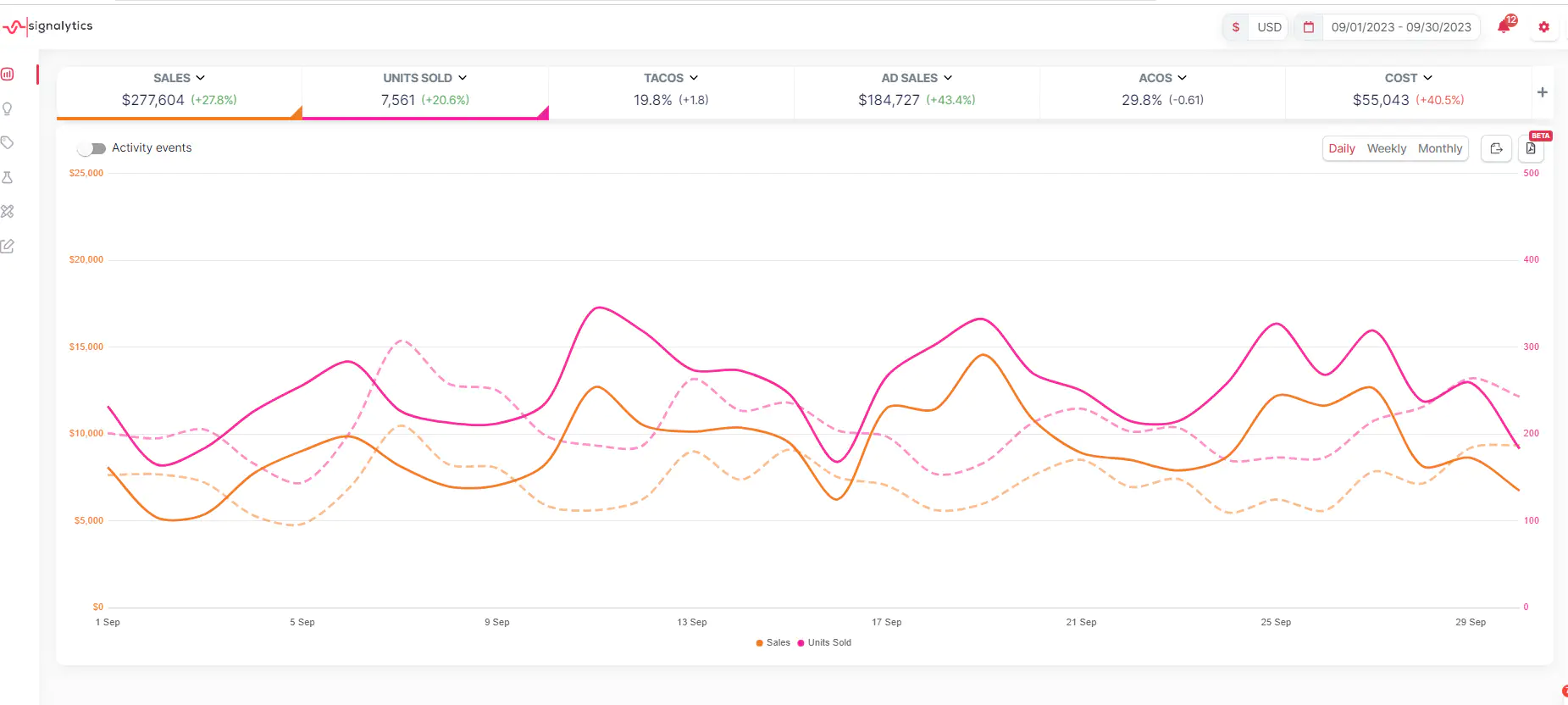
ACoS (Advertising Cost of Sales) shows how much you spend on ads compared to your ad-attributed sales. Divide ad spend by attributed sales and multiply by 100 for the percentage. If you spend $20 on ads and pull in $100 in sales, your ACoS is 20%.
A lower ACoS means your ads are working efficiently. Most sellers shoot for 15-30%, but your ideal number depends on your profit margin and goals.
TACoS (Total Advertising Cost of Sales) compares your ad spend to total sales—including organic. This number tells you if your ads are helping your whole business grow. If TACoS drops over time, your ads are probably boosting organic sales.
Keep an eye on both metrics. ACoS by itself doesn’t tell the whole story. Sometimes, ads with high ACoS still help your business by bumping up organic rankings.
Impressions, Clicks, and CTR
Impressions count how often shoppers see your ad. If impressions are high but clicks are low, your ad might not be grabbing people, or your product isn’t what they want.
Clicks show how many people actually click your ad. More clicks aren’t always better if those clicks don’t lead to sales.
Click-through rate (CTR) is clicks divided by impressions. A 0.5% CTR means 5 out of 1,000 people who see your ad click on it. On Amazon, average CTR falls between 0.3% and 0.5%, but competitive products can hit 1% or more.
If your CTR is low, your main image, title, or price could use some work. Try testing different images or keywords to see if you can bump that number up.
Conversion Rate and Attributed Sales
Conversion rate tells you what percentage of clicks turn into purchases. If 100 people click your ad and 15 buy, you’ve got a 15% conversion rate. Amazon’s average is around 10-15%, but top listings can go higher—sometimes 20% or more.
Attributed sales are the total revenue from ad clicks within a set window. Amazon tracks purchases made within 7 days for Sponsored Products and Sponsored Brands.
Conversion rate has a direct impact on ad profitability. A higher conversion rate means every click is worth more, so you can bid more on keywords without hurting your ACoS.
ROAS, CPC, and Profit Margin
ROAS (Return on Ad Spend) is just ACoS flipped on its head. Divide attributed sales by ad spend. If you get a ROAS of 5, you earn $5 for every $1 spent. Most profitable campaigns hit ROAS above 3.
Cost-per-click (CPC) is what you pay for each click. Amazon’s average CPC ranges from $0.50 to $1.50, depending on your category and competition. Watching CPC helps you keep your budget in check and fine-tune your bids.
Your profit margin sets the ceiling for your ACoS. If your product’s margin is 40% before ads, you can’t afford an ACoS above 40% without losing money. You need to know your break-even ACoS to avoid running unprofitable campaigns.
Building a Robust Campaign Structure
The way you structure campaigns determines how much control you have over ad spend and how efficiently you can optimize. How you organize campaigns, ad groups, and targeting directly affects your ability to scale profitably.
Campaign Architecture Essentials
Your campaign architecture should balance control with simplicity. Most successful Amazon sellers set up single product ad groups as their baseline. That means one campaign per product line, and each variation gets its own ad group.
Each campaign needs clear budget controls and placement settings. Inside those campaigns, ad groups should link specific products to keywords you can track and optimize separately.
It’s crucial to separate branded and non-branded campaigns. Branded keywords convert at much higher rates, so mixing them with non-brand terms will skew your data. Always exclude your brand terms from non-brand campaigns to keep things clean.
Campaign-level controls:
- Budget per product or category
- Placement modifiers for top of search, product pages, and the rest
- Choice of dynamic bidding strategy
Ad group-level controls:
- Individual keyword bids per product
- Track product-to-keyword performance
- Negative keyword targeting by variation
Portfolio and Ad Group Organization
Portfolios help you group campaigns by product line, brand, or strategy. You can set shared budgets across several campaigns and see performance all in one place.
Use portfolios when you’re managing multiple related products with similar marketing goals. This works well for categories or seasonal collections that need a coordinated spend.
Inside campaigns, ad group organization impacts targeting precision. Single product ad groups let you see which variation converts on which keyword. If you put multiple products in one ad group, they share bids—which can be a headache if they have different prices or conversion rates.
A $20 product and a $200 product shouldn’t share the same keyword bids. Separate ad groups let you optimize each one the right way.
Automatic vs. Manual Campaigns
Automatic campaigns let Amazon’s algorithm match your products with relevant searches. You don’t pick keywords; auto targeting uses product details, category, and shopper behavior.
Manual campaigns put you in charge of which keywords or products to target. You set the bids and control where your ads show up.
Run both types together. Automatic campaigns help you find new keywords that convert, which you can then move over to manual campaigns for tighter control. Manual targeting lets you bid hard on proven winners and test new ideas with less risk.
Automatic campaigns are best for:
- Launching new products without much keyword data
- Finding unexpected search terms that convert
- Keeping baseline visibility with little management
Manual campaigns are best for:
- High-volume keywords where bid precision matters
- Exact match targeting for proven converters
- Competitor targeting and defensive strategies
Segmentation for Efficiency
Split campaigns by match type so you can track performance cleanly. Broad match campaigns dig up new opportunities but might bring in irrelevant clicks. Exact match campaigns convert better but reach fewer shoppers.
Set up separate campaigns for research and performance. Research uses broad and phrase match with lower bids to test new keywords. Performance campaigns use exact match with higher bids on keywords you know work.
| Segment Type | Purpose | Typical ACOS Target |
|---|---|---|
| Brand Defense | Protect your listings from competitors | 10-15% |
| Non-Brand Exact | Drive sales on proven keywords | 20-30% |
| Broad Research | Discover new converting terms | 40-60% |
| Competitor | Capture competitor traffic | 30-50% |
Match your segmentation to your catalog size and your team’s bandwidth. If you have fewer than 50 products, single product campaigns give you the most control. Bigger catalogs need grouped structures to stay manageable. The campaign manager should be able to tell what each campaign does just by looking at the name and setup.
Keyword and Targeting Strategies for Growth
A strong keyword and targeting strategy helps you reach the right shoppers at the right time. Honestly, the gap between wasted spend and profitable growth often comes down to how well you pick keywords, organize match types, and use targeting to connect with buyers who are ready to buy.
Keyword Research and Match Types
Keyword research really begins with figuring out what people actually type into Amazon when they’re hunting for products like yours. Start by jotting down your product’s main features, benefits, and use cases. Peek at competitor listings and see which words pop up in their titles and bullet points.
Amazon gives you three match types, each controlling how closely a shopper’s search needs to match your keyword. Exact match only shows your ads when someone searches for that specific keyword or a very close variant. Phrase match triggers ads if your keyword is part of a longer search. Broad match is the loosest, it lets Amazon show your ads for related searches, even if the wording isn’t exact.
You get the most control with exact match campaigns, and the performance data tends to be the cleanest. Put your proven winners here, the keywords you know convert.
Phrase match lets you catch variations of your core keywords without getting too narrow. Broad match is best early on when you’re still figuring out which search patterns matter.
Start new products with automatic targeting and broad match to gather data. Once you spot which terms actually convert, move them into exact match campaigns so you can manage bids more tightly.
check out our Amazon Marketing Cloud Agency here
Negative Keywords and Search Term Reports
Negative keywords help you avoid wasting your budget on irrelevant searches. Skip them, and your campaigns will burn money on clicks that rarely turn into sales.
The search term report tells you exactly what shoppers typed before clicking your ad. Check this report every week and look for two things: keywords that are winning and deserve more budget, and irrelevant terms you should block.
If a search term gets clicks but never any sales, or if it clearly doesn’t match your product (like “coffee beans” when you only sell coffee makers), add it as a negative keyword.
Use negative exact match to block just one term but keep variations. Go with negative phrase match if you want to block any search containing that phrase. Amazon also offers negative broad match, but honestly, exact and phrase negatives usually give you better control.
Review your search term report every seven days. As campaigns keep running, new irrelevant terms pop up. Staying on top of negative keyword management keeps your budget focused on people who actually want to buy.
Product and Audience Targeting
Product targeting lets you put your ads on specific competitor ASINs or product categories. This works great when you know which products your customers also check out or buy.
Competitor ASINs are a powerful option. Find top competitors in your space and target their detail pages. Shoppers looking at those listings already want your type of product, which often means better conversion rates than broad keyword campaigns.
You can also go after complementary products. Selling yoga mats? Try targeting listings for yoga blocks or resistance bands. That way, your product shows up for shoppers already buying related stuff.
Audience targeting taps into Amazon’s shopper behavior data. Amazon audiences include lifestyle segments, in-market groups, and remarketing lists. With remarketing, you can reach people who viewed your product but didn’t buy.
Automatic targeting breaks down into four types: close match, loose match, substitutes, and complements. Close match grabs searches similar to your product. Loose match goes after broader, related searches. If you split these into separate campaigns, you’ll get cleaner data and easier optimization.
Harvesting and Optimizing High-Performing Keywords
Harvesting means moving proven search terms from automatic or broad match campaigns into exact match campaigns. This is how you turn discovery data into profitable, controlled growth.
Run discovery campaigns for at least 14 days before harvesting keywords. Watch for search terms that hit your targets for conversion rate and ACoS. When a term proves it can convert profitably, add it to an exact match campaign.
High-performing keywords deserve more budget and attention. If a keyword consistently drives sales in exact match, consider raising bids to boost ad placement and grab more traffic. Check these terms every week to make sure they’re still performing as competition shifts.
After you move a keyword to exact match, add it as a negative exact match in your discovery campaign. This stops the same term from spending budget in both places and keeps discovery focused on new opportunities.
Harvesting isn’t a one-and-done thing. Set a weekly schedule to review search term reports, spot new winners, and move them into exact match. Over time, you’ll build a library of keywords that reliably drive profitable sales.
Optimizing Bids, Budget, and Placement
Getting your bids, budget, and placements right can make the difference between profitable Amazon ads and a drained account. Each bidding strategy has its own purpose, and your budget choices should match where your product sits in its sales journey.
Bidding Strategies and Placement Modifiers
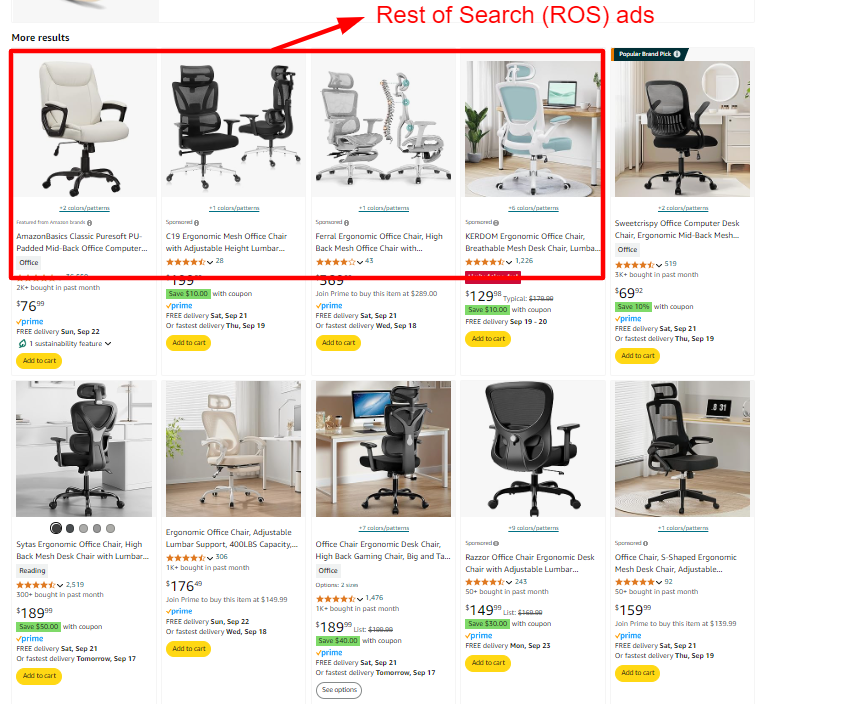
Amazon lets you decide where your ads show up and how much extra you’ll pay for premium spots. Top of search placements usually convert better than product pages, but you’ll pay more per click.
Placement modifiers let you bump up your bid by a set percentage for certain spots. You can boost bids for top of search (first page) anywhere from 0% to 900%. Most sellers stick to modifiers between 50% and 200% for top of search, depending on margins and conversion rates.
Common placement modifier ranges:
- Top of search: 100-200% for established products
- Product pages: 25-75% for targeting competitor listings
- Rest of search: 0% (just use your default bid)
Test your modifiers by checking placement reports in campaign manager. If top of search is getting you sales at a good cost, bump up the modifier. If it’s too pricey, dial it back or turn it off.
Dynamic Bids vs. Fixed Bids
With dynamic bidding, Amazon tweaks your bids in real-time based on how likely a click is to convert. Fixed bids, on the other hand, never change—what you set is what you pay.
Dynamic bids – down only drops your bid if a click looks less likely to convert. This helps protect your budget but can reduce visibility. It’s a good fit for products with tight margins or lots of competition.
Dynamic bids – up and down can raise bids up to 100% for likely conversions and lower them when things look iffy. For top of search, Amazon can even double your bid. This aggressive approach works well for launches or products with strong conversion rates.
Fixed bids keep things simple. You set the bid and it doesn’t budge. That’s great for predictable budget planning, especially when you know your profitable bid range.
New products usually do better with dynamic up and down at launch, to maximize exposure. Once a product matures, dynamic down only or fixed bids tend to work best after you’ve nailed down profitable levels.
Daily Budget Management
Your daily budget sets the ceiling for what Amazon can spend on a campaign each day. If it’s too low, your ads disappear before the day’s over. Set it too high and you might burn cash on underperforming campaigns.
Aim for a budget that covers at least 10-20 clicks per day. That usually gives you enough data to make smart calls. If your average CPC is $1.50, start with $15-30 daily.
Amazon can go up to 25% over your daily budget on busy days, but monthly spend won’t exceed daily budget times days in the month. Check your spend weekly to catch any surprises early.
When campaigns are doing well, raise budgets gradually. A 20-30% weekly bump lets you scale without wild swings that could waste money on untested traffic.
Budget Allocation for Lifecycle Stages
Different product stages need different budget tactics. Launch campaigns need aggressive spending to build visibility and collect reviews. Mature products should focus on profitability.
Launch phase (0-3 months):
- Put 60-70% of your ad budget here
- Accept higher costs to get traction
- Focus on impressions and clicks over profit at first
Growth phase (3-12 months):
- Shift to 40-50% of budget
- Optimize based on real conversion data
- Balance visibility and profit goals
Maturity phase (12+ months):
- Stick to 30-40% of budget
- Focus on margins
- Defend your turf from competitors
Split your budget across campaign types based on what’s working. Sponsored Products usually get 60-70%, Sponsored Brands 20-30%, and Sponsored Display 10-20%. Adjust as needed for your category.
Driving Results With Advanced Ad Formats
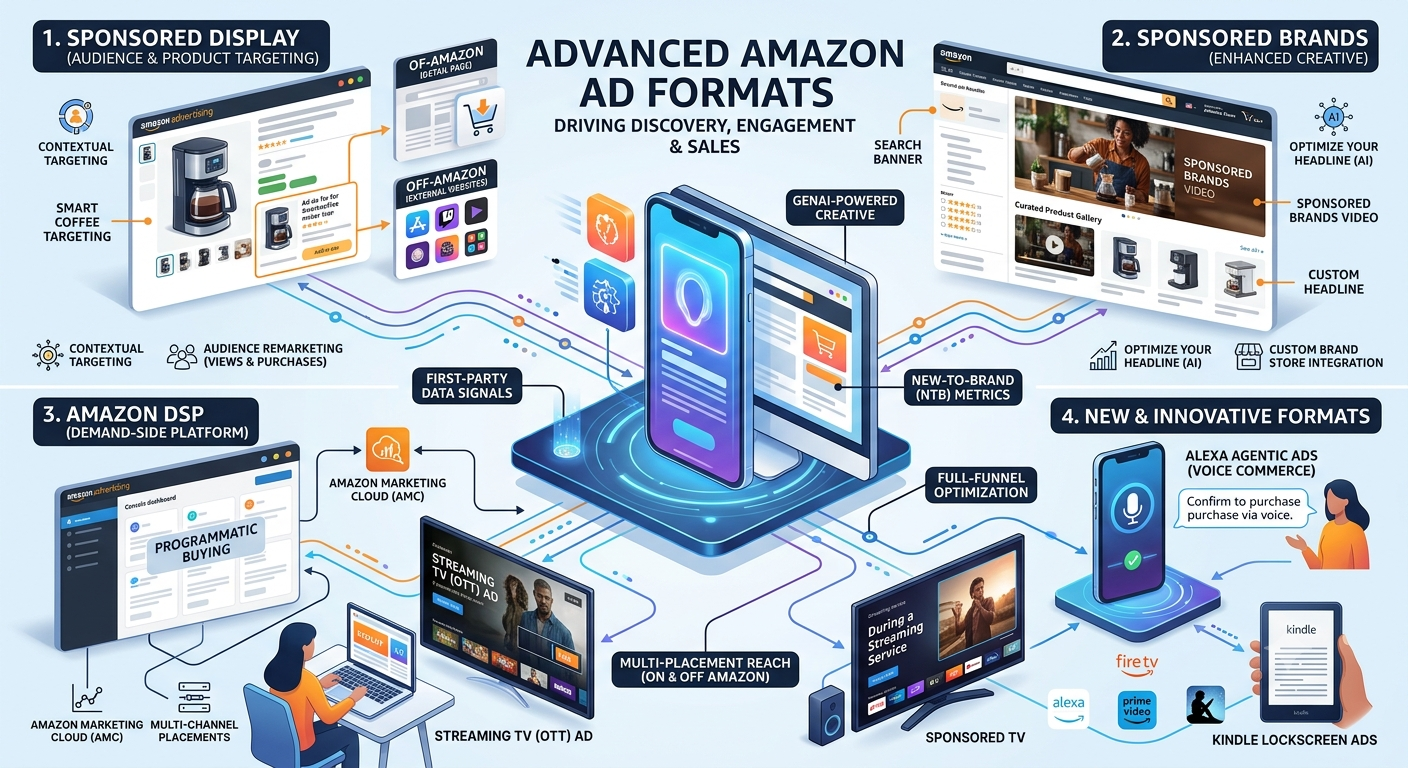
Amazon’s ad platform is way more than just basic search ads. Every ad format fits a different stage in the customer journey, from discovery with Sponsored Products to brand building with video ads and retargeting with Sponsored Display.
Sponsored Products Tactics
Sponsored Product ads are the bread and butter of most Amazon ad strategies. They show up right in search results and on product detail pages, catching shoppers with high purchase intent.
Keyword targeting means juggling all three match types. Broad match uncovers new search terms and variations, but you’ll need to manage negatives carefully. Phrase match gives you some control while still catching relevant variations. Exact match is your precision tool—use it for your best-converting keywords.
Product targeting (ASIN targeting) puts your ads on competitor product pages and complementary products. When targeting competitors, pick products with fewer reviews or higher prices. For complementary products, look for items people often buy with yours.
Keep auto campaigns running alongside your manual ones. They’ll show you which search terms actually convert, not just the ones you think should. Download search term reports every week to find winning keywords for manual campaigns.
Sponsored Brands and Video Ads
Sponsored Brands show up at the top of search results with your logo, custom headline, and several products. These premium placements build brand recognition and usually get higher click-through rates than standard ads.
Your headline should include your main keyword and a clear value proposition. Try out different angles—maybe focus on price, quality, selection, or unique features. Pick products that are your best sellers or work well together.
Sponsored Brands Video ads usually beat static brand ads for engagement and conversions. Show your product in action within the first three seconds—most shoppers scroll fast. Keep videos short, about 15-30 seconds, and add captions since a lot of people watch with the sound off.
Store Spotlight ads send traffic to specific pages in your Amazon Store. These work well for seasonal collections, new launches, or landing pages that show off your full range.
Sponsored Display and Remarketing
Sponsored Display ads reach shoppers both on Amazon and across the web. They’re great for remarketing to folks who checked out your products but didn’t buy.
Retargeting campaigns should focus on shoppers who visited your product page in the last 7-14 days. Bid higher for recent visitors (1-3 days) since they showed strong interest. Add review counts and Prime badges to your creative—these help overcome common purchase hesitations.
Contextual targeting puts your ads on related product pages. Target categories and products that attract your ideal buyers. Selling yoga mats? Go after fitness equipment, activewear, and wellness products where your shoppers are already browsing.
Audience targeting uses Amazon’s shopping data to reach specific customer segments. Target by lifestyle, recent purchases, or category interest. These audiences don’t convert as well as retargeting, but they help you reach new customers.
Amazon DSP and Off-Amazon Expansion
Amazon DSP gives you programmatic access to display and video inventory across Amazon sites and third-party websites. It’s pretty enterprise-level—expect to spend at least $10,000 a month for self-service or $35,000-50,000 for managed service.
The big advantage with DSP is Amazon’s first-party shopping data. You can target based on actual purchase history, product views, and browsing behavior. That kind of intent data isn’t available anywhere else.
Display campaigns through DSP show up on Amazon.com, IMDb, Twitch, Fire TV, and thousands of other sites. Use DSP for upper-funnel awareness or to retarget shoppers who didn’t buy.
Video campaigns run across Amazon’s streaming properties like Fire TV and IMDb TV. Videos work especially well for products that need a demo or lifestyle context. Target people who just checked out competitor products or related categories to catch them while they’re still considering.
Attribution through Amazon DSP tracks conversions more accurately than third-party platforms since Amazon can see purchase behavior across its entire ecosystem.
Integrating PPC With Listing and Brand Strategy
PPC doesn’t work in a vacuum. Your campaign’s success depends on listing quality, organic ranking, and whether your brand strategy lines up with how you spend on ads.
Listing Optimization and A+ Content
You’ve got to make sure your listing converts before throwing more money at PPC. If your title’s weak, your images look bad, or you skip A+ Content, you’re just burning budget on paid clicks that go nowhere.
Take a good look at your main image and compare it to what your competitors show in the same search results. Put the exact search terms you’re bidding on in your title—don’t leave that to chance.
Bullet points should answer the real questions shoppers have when they search for your product. Let’s say you’re bidding on “stainless steel water bottle.” You’d better show the stainless steel in your images and mention it in the title, or shoppers might just scroll past.
Use A+ Content to back up the same value props you highlight in your Sponsored Brands creative. If your video ad says “durable,” make sure your A+ modules repeat that claim. Keeping things consistent like this can really improve your conversion rate and bring down your cost per acquisition.
Before you bump up your bids or budget, double-check your price, reviews, delivery promise, and Buy Box status. If those aren’t competitive, PPC just amplifies a weak listing—it won’t fix trust issues with your product page.
Amazon Store and Brand Registry
Brand Registry opens up Sponsored Brands, Sponsored Brands Video, and Stores. Your Amazon Store becomes the landing zone for branded and category campaigns. A well-organized Store can boost traffic quality and give you more control over what happens after the shopper clicks.
Use your Store to split up product lines, highlight your hero SKUs, and guide shoppers through your catalog. When you run Sponsored Brands, send shoppers to relevant Store pages instead of dumping them into generic search results. This makes cross-sells and repeat visits more likely.
Brand Registry also keeps your brand name and listings safe from unauthorized changes. That’s huge for PPC—listing suppression, title edits, or image violations can wreck your campaigns in the middle of a push.
Organic Ranking and Sales Velocity
PPC, if you use it right, helps support your organic ranking. Sales velocity from paid traffic feeds Amazon’s ranking algorithm. When you launch a new product, the conversion volume and search term relevance you get from PPC help you earn organic visibility.
Once you rank organically for a search term, you can pull back on PPC bids and move that budget to new keyword opportunities. People call this harvesting. The idea is to spend less on ads as a percentage of total sales, but still keep revenue growing.
Track your organic sales separately from ad-attributed sales. If TACoS goes up but your total sales don’t, PPC might just be cannibalizing your organic demand. But if organic sales climb as you scale PPC, you’re on the right track.
Brand Defense and Product Launches
Brand defense campaigns protect your branded search terms from competitors. Give these campaigns their own structure, budget, and bidding rules. Branded terms usually convert cheaper, so don’t mix their results with non-branded campaigns or you’ll miss problems.
Bid high enough to stay at the top for your brand name and hero product terms. If you lose branded visibility to competitors, your customer acquisition costs will spike.
For new product launches, PPC takes on a different job. Focus launch campaigns on search term discovery, proving conversions, and sending early ranking signals. You’ll need a decent budget to collect data and build sales velocity, even if your initial ACOS is ugly.
Keep launch campaigns separate from your mature profit campaigns. A new product won’t perform like your old best-sellers, and using the same ACOS target just leads to bad calls. Once it proves itself and starts ranking, move it into your scale and defense campaigns.
Monitoring, Automation, and Continuous Improvement
Regular check-ins and smart automation can turn decent Amazon PPC campaigns into profitable ones. You’ll need to run audits, use the right tools, set clear ROI targets, and make data-driven decisions to stay ahead.
PPC Audits and Reporting
A PPC audit digs into your campaign structure, spending, and performance to spot waste and opportunity. Do a full Amazon PPC audit at least every 30 days. For high-spend accounts, weekly is better.
Your audit should cover a few basics:
Campaign Structure and Organization
- Stick to consistent naming conventions.
- Keep ad groups tightly themed.
- Use match types the right way.
- Apply negative keywords across campaigns.
Performance Metrics by Campaign Type
- Watch ACoS trends over 30, 60, and 90 days.
- Check click-through rates by keyword and product.
- Compare conversion rates to your baseline.
- Flag wasted spend on non-converting search terms.
Budget Allocation and Pacing
- Spot campaigns hitting budget caps early in the day.
- Find strong campaigns that aren’t spending enough.
- Review how you split budget across product lines.
Track these in a simple spreadsheet or dashboard. Agencies use automated reporting tools, but you can build decent reports by hand. The main thing is to catch issues before they drain your budget.
Using Automation Tools
Let automation handle the boring stuff so you can focus on strategy. Start with rule-based automation before getting fancy with algorithms. Rule-based tools take action when certain conditions are met.
Common automation rules:
- Drop bids by 15% if ACoS goes above target for 14 days.
- Pause keywords after 30+ clicks and zero conversions.
- Raise bids by 10% if ACoS is 5% below target.
- Add top-performing search terms as exact match keywords.
Set minimum thresholds before rules fire. Wait for at least 20 clicks on a keyword before changing bids. For algorithmic optimization, you want 100+ conversions per campaign.
Amazon’s built-in tools offer basic automation for free. Dynamic bidding adjusts bids in real-time based on conversion chances. Campaign budget rules scale spend up or down based on how you’re doing.
Third-party tools can do more, but only if you have enough data. Most need at least 500 account-level conversions per month to work well. If you’re below that, simple rules usually beat the complex stuff.
Always set safety nets. Put max bid caps and min bid floors in place to keep spending in check. Review what automation did each week—especially in the first month—to make sure rules don’t go haywire.
ROI Evaluation and Break-Even ACoS
Your break-even ACoS tells you the highest ad cost you can handle without losing money. Figure it out using your profit margin before ads.
Break-even ACoS formula:
Break-even ACoS = (Product Price – Product Cost) ÷ Product Price × 100
If you sell a product for $40 and it costs you $24, your break-even ACoS is 40%. Stay below that, and you make money. Go above, and you’re losing money on every sale.
Set your target ACoS lower than break-even to cover other business costs. Most sellers shoot for 60-80% of break-even. So if your break-even is 40%, target 24-32% ACoS in your campaigns.
Keep an eye on TACoS too. TACoS shows ad spend as a percent of total sales, not just ad-attributed sales. Lower TACoS means your ads are driving organic growth. Just calculate: Ad Spend ÷ Total Sales × 100.
ROI matters more than ACoS when you judge campaign success. A 30% ACoS means you get $3.33 back for every dollar spent. At 15% ACoS, you’re getting $6.67 per dollar. Both can be profitable, depending on your margins.
Scaling and Adjusting Strategy
Scale up winning campaigns slowly so you don’t kill profitability. Bumping budgets by 20-30% per week usually works better than doubling overnight. Move too fast, and you’ll see higher clicks costs and lower conversion rates.
Let your Amazon PPC strategy change with your product’s stage and goals. New launches can handle higher ACoS for visibility and reviews. Once you’re established, focus on efficiency and holding your ground.
Scale when you see:
- ACoS stays below target for 30+ days.
- Campaigns hit budget limits before the day’s over.
- Search impression share is under 50%.
- Organic ranking is strong and supports your paid traffic.
Cut back if results dip. Drop budgets by 15-20% if ACoS goes over target for three weeks in a row. Don’t react to daily noise—wait for trends.
Try new match types and targeting in their own campaigns. Broad match works well if your exact and phrase match campaigns are solid. Automatic campaigns can surface search terms you’d never think to target manually.
Change your PPC approach with the seasons. Q4 usually needs higher bids and bigger budgets thanks to more competition. In Q1, you can often spend less and get more for your money. Check out what competitors are up to each month and move budgets to your best-margin products when things slow down.
Connect to Signalytics for White Label PPC Management Service
Frequently Asked Questions
Building profitable Amazon ad campaigns isn’t easy—you need clear answers on structure, targeting, budgets, and performance tracking. Getting these basics down helps you make smarter decisions and avoid burning money on ads that just don’t convert.
How do you build an effective campaign structure for sponsored ads on Amazon?
Start by grouping campaigns around product categories or themes. Don’t just throw everything into one campaign. This way, you can control budgets better and see which groups really pull their weight.
Set up separate campaigns for each match type. Run one campaign for exact match keywords, another for phrase match, and a third for broad match. This lets you tweak bids based on how each match type performs.
Try single keyword ad groups if you want maximum control. That means one ad group, one keyword—so you can set precise bids and track results closely. If your budget’s tight, group similar keywords to keep things manageable.
Always run automatic campaigns alongside manual ones. Automatic campaigns help you find new keywords real shoppers actually use. Check them often and move good search terms into your manual campaigns.
What are the best ways to research and select keywords and targeting options for Amazon ads?
Start with your product listing to find seed keywords. Look at your title, bullet points, and backend search terms. These are the words customers might actually type.
Type your main keywords into Amazon’s search bar and see what auto-completes. Those suggestions are real searches people make every day.
Look at your competitors’ listings to spot keywords they’re targeting. Check their titles and bullet points. If you see the same terms over and over, they probably drive sales.
Download your automatic campaign search term reports every week. Filter by orders or clicks to find what’s already converting. Add those winners to your manual campaigns as exact or phrase match.
Target competitor ASINs with Sponsored Display ads. Your ads show up right on their product pages—where shoppers are comparing. Focus on products with similar prices and features to yours.
How much should you budget for Amazon advertising, and what factors drive costs?
Plan to spend about 10-15% of your target revenue on ads when you’re starting out. So, if you want $10,000 in sales, set aside $1,000 to $1,500 for ads. That percentage usually drops as your organic ranking improves.
Your cost per click depends on your category and how crowded it is. Competitive spaces like supplements or electronics can run $1-3 per click. Niche products might cost $0.30-0.80 per click. Always check your category’s average CPC before setting your budget.
Product price plays a big role in how much you can afford to spend. Higher-priced products give you more room to bid aggressively. If you’re selling something under $20, you’ll need to watch costs closely to stay profitable.
Start with at least $10-20 per campaign each day. Lower budgets can run out too fast and stop Amazon from collecting enough data to optimize. If costs get out of hand, you can always dial it back.
Which performance metrics matter most, and how do you optimize bids and placements based on them?
ACoS (Advertising Cost of Sale) tells you what percent of your sales go to ads. Spend $25 in ads to make $100 in sales? That’s a 25% ACoS. Most sellers aim for 20-35% ACoS, depending on their margins.
Conversion rate tracks how many clicks actually turn into sales. If you’re below 10%, something’s off—maybe your keywords don’t match what buyers want, or your product page needs work. Fix that before spending more on ads.
Impressions tell you how often your ads show up. If impressions are low, your bids might be too low or your keywords aren’t relevant. Try raising bids by 20-30% if you’re stuck under 1,000 impressions a week.
Check placement performance to see where ads convert best. Top of search usually gets the most sales, but costs more per click. If your ACoS is too high, lower your top of search bid adjustment and shift some budget to product pages.
Tweak bids on keywords every 7-10 days. Raise bids by 15-25% on keywords that beat your ACoS target and convert well. Cut bids by 25-50% on keywords with high ACoS and poor conversions.
When should you prioritize paid ads versus organic optimization to grow product visibility?
If you’re launching a new product with zero reviews or sales, start with paid ads. Organic ranking just takes too long to kick in, but ads can put you in front of shoppers right away.
Keep those ads running until you see about 15–25 reviews and some steady daily sales.
When your listing has obvious issues, like a conversion rate stuck below 8% despite getting traffic, shift your focus to organic optimization. Update your images, title, or bullet points—otherwise, you’ll just throw money at ads that don’t convert.
Honestly, bad listings just burn through your ad budget.
Mix both strategies for the best results. Ads bring in the first wave of traffic and sales, which then boosts your organic ranking over time. As your organic ranking improves, you won’t need to rely so heavily on ads, and your advertising costs drop.
Once you break into the top 10 for your main keywords, move more of your budget toward organic efforts. At that point, your product shows up naturally in search results and sells without much ad spend.
Still, it’s smart to keep a small ad budget to fend off competitors.
During peak seasons or product launches, ramp up your ad spend. These are the moments when aggressive advertising really pays off with higher conversions and better ROI.
When things slow down, pull back on ads and let organic sales carry you through those quieter months.
What skills and experience are required to become an Amazon advertising specialist, and what do typical roles pay?
If you want to become an Amazon advertising specialist, you really need to get comfortable with campaign structure, keyword research, and bid optimization. Honestly, these basics are the heart of managing any Amazon PPC account.
Most folks pick up these skills by actually running real ad campaigns. There’s just no substitute for getting your hands dirty.
Digging into Amazon’s advertising console is a must. You’ll need to analyze data, pull reports, and try to spot trends. Sometimes you have to catch underperforming keywords before they burn your budget.
Numbers matter. If you aren’t at least a little comfortable with spreadsheets and basic math, this job gets tough fast.
Entry-level Amazon PPC specialists usually make between $40,000 and $55,000 a year. In these roles, you’ll manage campaigns with some supervision and handle the more routine optimization work.
Most companies want you to have at least 6-12 months of experience before they’ll consider you for an entry-level spot.
If you’ve got 2-4 years under your belt, you can expect to earn somewhere between $60,000 and $85,000 a year. At this stage, you’re juggling multiple accounts and building strategies for different product lines.
You might also find yourself training junior team members or explaining results to clients. It’s not all spreadsheets and numbers.
Senior Amazon advertising specialists and managers can pull in $90,000 to $130,000 or even more.