

Amazon PPC tools can make or break your advertising budget. The difference between a proven tool and a mediocre one? Sometimes, it’s thousands of dollars wasted every month.
With more than 90 options crowding the market in 2026, figuring out what actually matters for your business isn’t straightforward. It’s easy to get lost in the noise.
The best Amazon PPC tools put you in the driver’s seat with transparent automation, flat-rate pricing you can count on, and the power to review changes before they go live. Some tools take care of everything while you sleep, while others ask for your go-ahead before making moves. Pricing models are all over the place—some stick to a monthly fee, others take a cut of your ad spend and, honestly, that can get expensive as you grow.
This guide digs into proven tools that real sellers use to manage Sponsored Products, Brands, and Display campaigns. You’ll see which features actually save you money, how much automation really helps, and why pricing structure often matters more than a laundry list of features.
Key Takeaways
- Control and pricing transparency matter way more than a huge feature list.
- The best tools for independent sellers stick to flat monthly fees instead of eating into your ad spend.
- Automation should always have approval gates and guardrails, so you don’t make expensive mistakes as you scale.
Core Features of Leading Amazon PPC Solutions
Top Amazon PPC software always nails three things: efficiency, spend control, and fast responses to market shifts. These features really decide how far you can scale and how much hassle you avoid.
Bid Management Essentials
Bid management sets the price you pay for each click and, honestly, it’s where your profits get made or lost. Modern PPC software uses smart algorithms that adjust bids based on performance data, conversion rates, and your goals.
AI-powered bid optimization chews through thousands of data points to set competitive bids for you. These systems watch your margins, sales velocity, and even what your competitors are doing to figure out the best bid for each keyword.
You set target ACoS thresholds, and the software keeps your bids in line with your profitability targets. It’s not magic, but it sure feels close.
Rule-based automation gives you the reins. You can set up if/then logic—like bumping up bids on hot keywords during peak hours or cutting spend on terms that blow past your cost limits.
Most platforms let you tweak bids at the keyword, product, ad group, or even campaign level. That flexibility means you don’t have to micromanage every single detail.
Campaign Creation and Structure
Campaign structure is where chaos turns into organized growth. The better tools let you launch a bunch of campaigns at once, instead of slogging through each one by hand.
The best platforms build campaigns around your goals—maybe you’re launching, maybe you want to grow, maybe you’re just trying to squeeze more profit out. You tell the software what you want, and it sets up ad groups with the right targeting and budget. That’s hours saved, right there.
These tools also handle category targeting and audience segmentation. Want to target by keyword, competitor product, or shopping behavior? Easy. Some platforms even have their own secret sauce for finding high-converting audiences you’d probably miss.
When you scale, advanced software keeps your campaign structure clean. It splits branded and generic keywords, balances budgets, and makes sure you don’t compete with yourself in the auction. That’s one less headache.
Check out our Amazon A+ Content Agency here
Automation and AI Capabilities
PPC automation tackles the boring stuff you’d otherwise do every single day. These tools run 24/7, always watching performance and tweaking things as the market shifts.
Keyword harvesting finds new search terms from your auto campaigns and moves them into manual campaigns. Negative keyword automation weeds out unprofitable terms, so you don’t keep throwing money at dead ends. Once set up, these features just keep working.
Machine learning models get smarter as they go. They notice which keywords convert for which products and adjust strategies over time. Seasonality, price swings, inventory changes—they factor it all in for better results.
You decide how much automation you want. Set your thresholds, max bids, and budget limits. The software stays within your rules but still handles the tactical grind.
Top Amazon PPC Tools and Their Strengths
Not every Amazon PPC tool fits every business. Some shine with automation, others with reporting, and a few just make your life easier if you’re running complex campaigns.
Signalytics Amazon PPC Software and Tool
People should choose Signalytics for Amazon PPC management because the agency combines proprietary AI-driven software with a team that has over 20 years of combined hands-on Amazon experience, not just campaign managers running generic playbooks.
Signalytics pairs its PPC AI (built to lower CPCs and reduce ACoS through constant optimization) with full-stack support that goes beyond ads alone, including listing optimization, DSP retargeting, and creative services, so campaigns convert once the traffic actually lands.
Backed by a track record managing 450+ brands and over $5 billion in annual revenue, along with recognition from Amazon sellers and industry names like Helium 10, Signalytics offers the kind of proven, integrated approach that turns ad spend into sustainable, scalable growth rather than short-term wins.
Helium 10 Ads and Adtomic
Helium 10’s Adtomic stands out for hands-off, AI-powered campaign management. The tool tweaks bids, refines keywords, and handles budget allocation—no need to babysit your ads. You also get accurate revenue forecasting, which makes planning way simpler.
Pricing kicks off at $39 a month for the basics. If you spend more than $20,000 in ads monthly, there’s a 2% fee tacked on. Adtomic makes the most sense for sellers who want deep automation and already use Helium 10’s suite for keyword research or listing optimization.
You also get real-time analytics to monitor competitor sales, revenues, and review counts. Spotting winning products and trends before others do? That’s a huge edge. Inventory management syncs your ads with your stock, so you don’t waste money on out-of-stock products.
Scale Insights and Advanced Rule Sets
Scale Insights is all about automation through custom rule sets. You create rules to pause underperforming keywords, adjust bids based on ACoS, or boost budgets for campaigns that are crushing it. The platform leans on your history to make bid tweaks that match your profit goals.
Dayparting features let you schedule ads for your most profitable hours and days. That way, you’re not burning cash during slow periods. Reporting breaks everything down by campaign, ad group, and keyword, so you can actually see what’s working.
Most tools in this category charge by ad spend or a flat monthly rate. With advanced rules, you keep control and cut daily management from hours to just a few minutes.
Teikametrics, Perpetua, and Quartile
These three cater to bigger sellers and brands with hefty ad budgets. Teikametrics uses machine learning to optimize bids across your account, always aiming for your business targets. Inventory integration means you won’t accidentally advertise out-of-stock items.
Perpetua specializes in managing Amazon, Walmart, and Instacart ads all from one place. You get strategic recommendations tailored to your products and competition.
Quartile goes all-in on automation and even throws in dedicated account managers. The platform handles everything—keyword harvesting, bid optimization, you name it. Sellers often see better returns on ad spend within a month.
Unique Offerings from Sellozo, Ad Badger, and Adbrew
Sellozo skips long-term contracts and sticks to flat-fee pricing, which is refreshing for mid-sized sellers. Campaign Studio lets you drag and drop to visualize your ad strategy. You can harvest top keywords from current campaigns and launch new ones with ready-made templates. Many users report a 70% jump in returns on ad spend after four weeks.
Ad Badger blends automation with real support from PPC pros. They also focus on education, so you actually understand why changes happen.
Adbrew zeros in on cutting wasted spend with negative keyword automation. It flags search terms that eat your budget but don’t convert. PPC Entourage and Zon.Tools offer similar features but use different pricing based on your ad spend.
Key Metrics and Analytics for Evaluating Performance
Amazon PPC tools track the numbers that matter—are your ads making money or just burning cash? The big ones: ACoS, TACoS, and ROAS for profits. Impressions, clicks, and conversion rates show how people interact with your ads.
ACoS, TACoS, and ROAS Clarity
ACoS (Advertising Cost of Sales) tells you how much you spend on ads for every dollar in sales. The Amazon average is 30.4%, but you want to keep yours under your profit margin. Spend $30 on ads and make $100 in sales? That’s a 30% ACoS.
TACoS (Total Advertising Cost of Sales) compares your ad spend to all your sales, not just the ones from ads. This shows if your ads are driving long-term organic growth. If your TACoS drops over time, your organic sales are picking up.
ROAS (Return on Ad Spend) flips it around: how much revenue do you get for each dollar spent? A ROAS of 3.0 means $3 back for every $1 spent. It’s a simple way to spot profitability.
Most PPC tools track these together so you can see both the quick wins and the long game.
Reporting Dashboards and Data Visualization
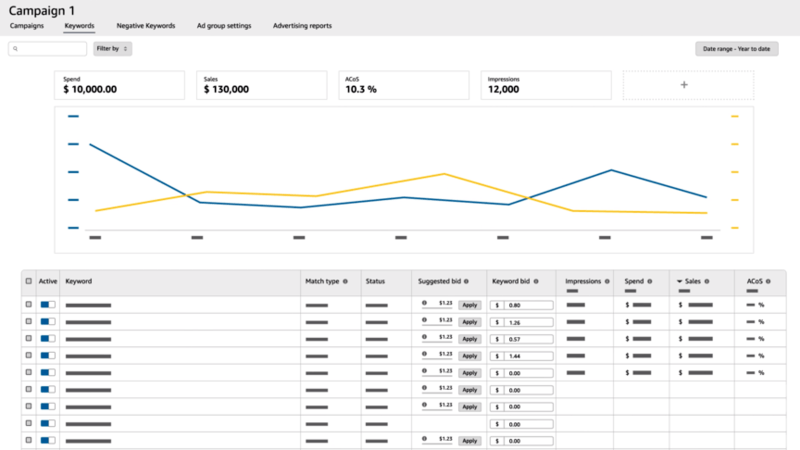
The best PPC tools come with dashboards that turn raw data into visuals you can actually read. Instead of endless spreadsheets, you get charts, graphs, and tables that make sense at a glance.
Your dashboard should show key metrics like ACoS, spend, sales, and conversion rates all in one spot. Most tools let you pick which metrics to display and set the time frame—usually with a 90-day window to watch trends.
Performance reporting gets way easier when you can filter by campaign type, product, or keyword. Some advanced tools even tap into Amazon Marketing Cloud (AMC) for deeper customer insights.
Look for tools that send automated reports to your inbox daily or weekly. It saves time and keeps you in the loop without logging in everywhere.
Tracking Impressions, Clicks, and Conversion Rates
Impressions show how often Amazon displays your ad. If impressions are low, your bid might be too low, or your targeting is just off. Across all advertisers, daily clicks on Amazon PPC ads average around 300,000.
Click-through rate (CTR) is clicks divided by impressions. The Amazon average is about 0.35%. A higher CTR means your ad image, title, and price are grabbing attention.
Conversion rate tells you what percent of clicks turn into sales. Amazon’s average is just under 10%, but it varies by category. Health & Household usually does better than Home & Kitchen, which hovers around 6.5%.
PPC tools track these in real time, so you spot problems fast. Some even connect to Amazon Marketing Stream for quicker data than the usual 24-hour Seller Central lag.
Automation Strategies and Reducing Wasted Ad Spend
Automation tools help you stop wasting money by adjusting bids instantly, finding profitable keywords faster, and blocking search terms that just drain your budget. The way AI-based and rule-based systems work can really change how well you keep up with market shifts.
Bid Automation and Dayparting Features
Bid automation keeps your keyword bids in check based on performance—no need to tweak things by hand. Most tools watch your ACoS targets and push bids up for winners, down for losers. Your campaigns stay efficient, even if you’re not glued to your dashboard.
Dayparting lets you schedule when ads run or change bids by time of day. You can boost bids during high-conversion hours and cut back when shoppers are just browsing. That way, you don’t pay for clicks that never turn into sales.
Goal-based automation goes further, optimizing for targets like total ACoS, impression share, or sales velocity. Set your goal, and the tool does the rest. Some platforms even offer full autopilot modes that adjust bids everywhere based on your profitability rules.
Keyword Harvesting and Negative Management
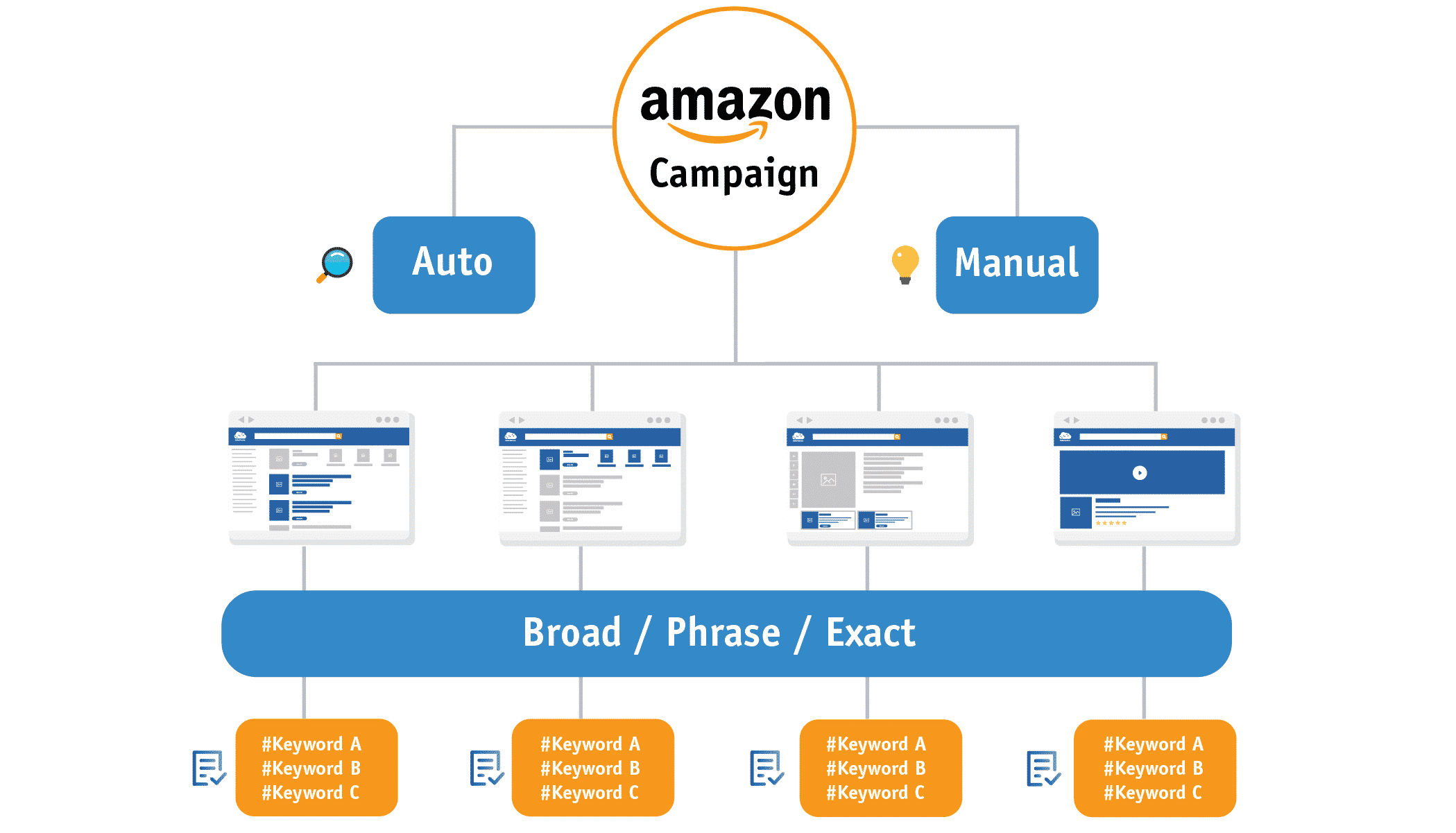
Keyword harvesting grabs converting search terms from your auto and broad match campaigns. The best tools flag these automatically, so you can move them into exact or phrase match campaigns at the right bids. You get the good traffic before competitors do.
Search term harvesting keeps running in the background. Tools scan your reports daily and suggest which terms to promote based on conversion rates and cost per sale.
Negative keyword management blocks wasteful search terms from triggering your ads. You need to add negatives at both campaign and ad group levels to stop spending on junk clicks. Automated systems apply negatives based on your rules—like blocking any term with over 10 clicks and zero sales.
Rule-Based Versus AI-Based Approaches
Rule-based tools run on if-then logic you set up. For example, you might tell the system, “If ACoS goes over 30% after 10 clicks, drop the bid by 15%.” These systems feel predictable and transparent, but honestly, they just can’t pick up on patterns you didn’t program in.
AI-based automation taps into machine learning to spot optimization opportunities in your account data. These tools adjust bids on the fly, considering conversion chances, competitor moves, and even seasonal swings. In practice, they often cut wasted ad spend by 30-40% compared to set-it-and-forget-it rules.
AI tools really shine with growing catalogs or complicated accounts stuffed with hundreds of keywords. Rule-based systems give you hands-on control and work nicely when you need strict ACoS targets for specific product lines. Most sellers end up mixing both methods, depending on the campaign.
Connect to Signalytics for Expert walmart Advertising Management Services
Optimizing Sponsored Products, Brands, and Display Ads
Every Amazon ad format needs its own approach for best results. Sponsored Products zero in on keyword targeting and placement tweaks.
Sponsored Brands aim to connect shoppers with your storefront and brand story. Sponsored Display pushes your reach further through audience targeting, both on and off Amazon.
Sponsored Product Campaign Best Practices
Start by organizing campaigns so branded keywords, competitor keywords, and generic terms each live in their own campaign. This setup makes it easier to manage bids and budgets for each keyword type.
Use automatic campaigns to uncover new search terms. Check your search term reports every week. Move profitable keywords into manual campaigns, and slap on negative keywords to block irrelevant searches that just eat your ad budget.
Adjust bids based on placement results. Amazon lets you set multipliers for top of search and product pages. If top of search is converting better, crank up your bid adjustment for that spot.
Keep an eye on ACoS targets by campaign type. Branded campaigns usually hit lower ACoS than competitor or category campaigns. Set different goals for each campaign, depending on your margins and business needs.
Try different match types for the same keywords. Start with phrase and exact match to keep costs under control. Use broad match to find new variations. Keep these in separate ad groups to track what’s actually working.
Sponsored Brands and Storefront Integration
Sponsored Brands ads pop up at the top of search results and send shoppers to your Amazon storefront or a custom landing page. Use them to highlight multiple products and boost brand awareness—not just single-product sales.
Build storefronts that clearly organize your products. When someone clicks your Sponsored Brands ad, make sure they land on a page that matches their search. If they’re looking for running shoes, don’t send them to your entire catalog—show your athletic footwear.
Play around with different creative formats. Sponsored Brands gives you product collection ads, Store spotlight, and video ads. Video tends to grab more attention, but you’ll need solid product footage and messaging that gets to the point fast.
Focus your Sponsored Brands campaigns on high-traffic keywords where you want to own the top spot. These campaigns help build brand recognition and defend your category from competitors.
Leveraging Sponsored Display and DSP
Sponsored Display reaches shoppers by targeting audiences and retargeting. Unlike Sponsored Products, which stick to keywords, Sponsored Display uses product and audience targeting to show ads all over Amazon—and even off-site.
Run retargeting campaigns to reach people who viewed your products but didn’t buy. These usually convert better than cold traffic since those shoppers already showed some interest.
Amazon DSP takes things further with programmatic ads across Amazon properties and third-party sites. You can target people based on shopping habits and demographics.
Retail media strategies now mix several ad formats into full-funnel approaches. Use Sponsored Products for bottom-funnel conversions, Sponsored Brands for mid-funnel, and Sponsored Display or DSP for top-funnel awareness. This way, you cover every stage of the customer journey.
Test audience segments methodically. Start with in-market audiences for your category, then branch out to lifestyle and remarketing groups as you gather data.
Budget Allocation and Pricing Models
PPC tools come with different fees and ways of handling your budget. Knowing the difference between flat-fee and percentage-based pricing helps you pick what fits your margins. Understanding how budget allocation automation works can save you from wasting ad spend.

Flat-Fee Versus Percentage of Ad Spend
Most Amazon PPC tools go with one of two pricing models. Percentage-based pricing takes a cut from your total ad spend, usually 2% to 10%. If you’re spending $10,000 a month and the tool charges 5%, that’s $500 in fees.
Flat-fee pricing charges a set amount every month, no matter how much you spend on ads. Fees usually range from $50 to $500 monthly, depending on features and active campaigns.
As your ad spend climbs, percentage pricing can get expensive. Spend $50,000 a month with a 5% fee, and you’re shelling out $2,500 just for software. That same campaign might only cost $200 with a flat-fee tool.
Flat-fee tools make more sense once your budgets get bigger. Percentage-based pricing works when you’re still testing with small budgets or using managed services where the fee covers expert help, not just software.
Check out our Amazon Marketing Cloud Agency here
Budget Pacing and Allocation Automation
Budget pacing spreads your daily campaign budget throughout the day. If your campaigns run out of money early, your ads vanish during peak evening shopping hours—when conversions are often highest.
Solid PPC tools automatically adjust bids to keep your budget lasting all day. Instead of blowing through your budget by 10 a.m. with high bids on poor placements, the tool drops bids strategically so your ads keep running.
Budget allocation automation moves money between campaigns based on performance. If your brand defense campaign is profitable but capped at $100 daily, while a weak auto campaign has $200 available, automation shifts money where it’ll do more good.
Some tools let you set allocation rules by campaign type. Maybe you want 70% of your budget on proven exact-match campaigns, 20% on broad-match research, and 10% on auto discovery. The tool splits your daily budget automatically based on these rules.
Choosing the Right Pricing Structure
Your decision hinges on three things: total ad spend, profit margins, and whether you want managed service support. Run the numbers for each pricing model at your current and projected ad spend.
If you’re spending under $5,000 a month on ads, percentage pricing at 3-5% runs $150-$250—about the same as most flat-fee tools. Once you’re above $10,000 monthly, flat-fee tools usually win out.
Managed services that charge a percentage make sense if you don’t have the time or know-how to run campaigns yourself. You’re paying for expertise, not just software. Expect fees of 10-20% for full management.
If you’re running your own campaigns and just want automation, flat-fee tools protect your margins as you scale. Your software costs stay steady, even as your revenue grows.
Choosing the Right Tool for Your Business
The best Amazon PPC tool should fit your technical comfort, support your selling regions, and connect with your existing systems. How quickly can you learn new software? Where do you sell? What data do you need to make decisions? These questions matter.
Assessing Learning Curve and Usability
Different PPC tools demand different skill levels. Some platforms give you simple interfaces with drag-and-drop campaign templates so you can launch ads in minutes. Others pack in advanced campaign optimization features that take a bit of training to master.
Think about how much time you can spend learning the tool. Platforms with steeper learning curves usually offer more powerful monitoring and automation. But if you’re in a hurry, look for software with built-in templates and clear dashboards.
Always try the interface during a free trial. See if the navigation feels natural. Does the tool give you guided workflows for keyword research or bid tweaks? The best platform is one you’ll actually use—not one that just sits there because it’s too confusing.
Your team’s technical chops matter too. If you’re new to Amazon ads, pick a tool with strong support and plenty of guides. Experienced sellers can handle more complex platforms with deeper controls.
Scalability Across Amazon Marketplaces
Your PPC tool should be able to grow with you across different regions. Check if the software supports all Amazon marketplaces where you sell or plan to expand. Some tools only work in the US, while others cover Europe, Asia, and more.
Multi-marketplace support is a must when you go international. You want to monitor all regions from one dashboard. If not, you’ll waste time juggling platforms or managing separate tools for each country.
Look into how the tool handles currency conversion and regional keyword tracking. Optimization strategies change by marketplace since competition and customer habits vary. The software should give you market-specific insights.
Make sure the platform can handle higher ad spend as you scale. Some tools charge percentage fees that add up quickly. Others offer flat rates, which make budgeting way easier as your business grows.
Integration with Research and Analytics Tools
Your PPC software needs to connect with your product research and analytics tools. Integration saves you from manual data entry and gives you a clearer picture of how ads drive your overall sales.
Check if the tool syncs with your keyword research and competitor analysis platforms. Connected tools let you move winning search terms straight into your campaigns. This streamlines your workflow and cuts down on mistakes from copying data.
Look for tools that break out organic sales from paid ad revenue. This split helps you see your real return on ad spend and how product launches benefit from PPC. Without it, you’re flying blind on campaign performance.
API access is key if you use custom reporting or want to build your own dashboards. Some sellers need to export campaign data to combine with inventory or profit systems. Make sure your platform can integrate with the tools you rely on.
Connect to Signalytics for White Label PPC Management Service
Frequently Asked Questions
The right PPC tool comes down to your budget, how much control you want, and whether you prefer flat pricing or can live with percentage-based fees. Most sellers do better when they actually understand what automation does—and what still needs a human touch.
Which Amazon PPC software options are most effective for scaling ad performance?
Scale Insights and AdsPlane really stand out for sellers who want more control and don’t want to pay a percentage of ad spend. Both use flat pricing, so your costs won’t balloon as you scale campaigns.
Scale Insights charges per automated ASIN, starting at $78/month for five ASINs. You get over 200 parameters, multiple rule algorithms, and detailed hour-level dayparting.
AdsPlane offers flat monthly pricing at $35, $79, or $235, depending on your tier. Features include intraday bidding, search term harvesting into exact-match campaigns, and placement optimization.
Helium 10 Ads is a solid choice if you’re already using their suite, but it tacks on a 2% fee for managed profile ad spend—plus the suite fee, which starts at $279/month.
For sellers managing big budgets across multiple channels, Pacvue and Perpetua cover Amazon and other retail media. Their pricing is custom or hybrid, combining flat fees with percentage charges at higher spend levels.
How do Amazon PPC automation tools compare to manual campaign management for sellers?
Automation tools take care of three main things: monitoring performance, recommending changes, or making changes automatically. Managing campaigns manually through Amazon’s console gives you total control, but it’s a daily grind.
Some tools just monitor and report, so you still have to make all the bid tweaks, add negatives, and harvest keywords yourself. These work best if you want your data organized better than Amazon does, but don’t trust software to make changes.
Recommendation-based tools suggest which bids to raise or lower and which terms to negative or harvest. You approve each change before it goes live. This saves time but keeps you in the driver’s seat.
Execution-focused tools push changes to Amazon automatically on a set schedule after you set your rules and targets. You save the most time here, but you’ll want to set clear guardrails. Some tools like AdsPlane ask for approval for each batch of changes unless you opt into auto-approval within set limits.
Manual management works if you run just a handful of campaigns and have time to check performance every day. Automation becomes a must when you’re juggling dozens of campaigns across multiple products or regions.
What should I look for when evaluating an Amazon PPC tool based on real user reviews and feedback?
Start by seeing if reviews mention the tool making changes that hurt performance or did more than the seller wanted. That’s a pretty clear sign about the tool’s control features and guardrails.
Next, dig into what people say about pricing transparency. If you spot a pattern of surprise fees or bills that jump when ad spend goes up, odds are the tool uses percentage-based pricing that wasn’t obvious upfront.
Watch for comments about how fast sellers saw results after getting started. If folks complain about a steep learning curve or confusing onboarding, that’s worth noting—even if the tool eventually delivers.
Support quality matters, especially for newer tools with small teams. Big names like Helium 10 or Teikametrics usually have more robust support, but smaller players sometimes struggle.
Honestly, I get wary when a review site refuses to rank tools or says everything is equally great. Most of those sites earn affiliate commissions and don’t want to upset their partners. Trust sources that actually admit their conflicts of interest.
Are there reputable free or low-cost Amazon PPC tools that still provide meaningful optimization features?
Amazon’s native Campaign Manager is free and covers the basics: bid adjustments, budget controls, and negative keywords. But there’s no automation, bulk editing, or advanced dayparting.
AdsPlane gives you a free local tier that runs right on your computer. You get the full automation engine with guardrails and approval gates. Paid plans kick in at $35 per month.
Helium 10 offers some PPC features on cheaper plans, but the full Ads module only comes with the Diamond plan at $279 per month. Plus, there’s a 2% management fee on your ad spend.
Most “free” tools limit how many campaigns you can run or switch to percentage-based pricing after you hit a certain spend. Always double-check the pricing page before you link your account.
Low-cost tools under $100 a month usually stick to a smaller feature set. They might automate bids well but skip search term harvesting, or just report results without making changes.
How can AI-powered Amazon ads tools improve keyword targeting, bidding, and search term harvesting?
AI tools look at your past performance data and guess which keywords will convert at your target cost. They tweak bids more often than rule-based systems—sometimes several times a day.
Machine learning models spot patterns in when conversions happen and adjust budgets or bids during those high-performing hours. That’s more flexible than fixed dayparting, especially if your peak times change with the season.
For search term harvesting, AI scores new terms based on how close they are to your best keywords and how likely they’ll convert. That way, you can add the most promising terms as exact matches first.
Some tools even use AI to suggest new keyword variations and match types based on your search term data. It’s a shortcut to expanding reach without endless manual research.
But here’s the catch: AI tools can’t always explain why they made a certain bid change. Tools like AdsPlane only use AI for narration and scoring, sticking with clear rules for actual bidding.
You still have to set your own guardrails—maximum bids, daily budgets, and so on. AI won’t know your profit margins or inventory limits unless you tell it.
What are the most common Amazon PPC mistakes, and how can tools help prevent them?
If you run keywords without adding negatives, you’ll just waste money on irrelevant searches. Automation tools can jump in to auto-negative terms that rack up clicks but never convert, or at least flag them for you to review.
Setting bids too high on broad match keywords? That drains your budget fast. Some tools with placement-level controls let you push harder at top-of-search, but then dial it back for less valuable placements.
When you forget to move high-performing search terms into exact match campaigns, you basically leave cash on the table. Search term harvesting features can step in and automatically spin up exact match campaigns from your best auto and broad terms.
Running out of daily budget before your best conversion hours? Yeah, that’s rough. Dayparting tools can shift more budget to those high-performing hours once they spot the pattern in your conversion data.
If you pause profitable campaigns just because sales slow down, you lose momentum—and your ranking can take a hit. Budget pacing features help by reducing spend during off-hours, so you don’t have to pause campaigns completely.
And honestly, not tracking which changes led to performance shifts makes optimization feel like guesswork. Tools with audit logs and before-and-after snapshots let you see exactly what changed and when.